

Quick Answer
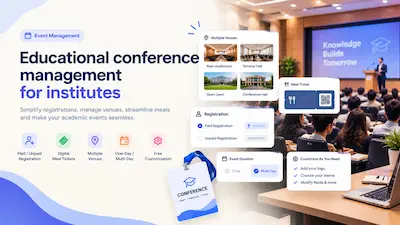
An educational conference is easiest to manage when registration, passes, meals, and entry all run through one system. That means a custom registration page for the institute, support for both paid and free registrations, QR passes sent automatically by WhatsApp and email, separate scanners for each venue or hall, a dedicated digital meal ticket scanner, and the ability to reuse the same pass across every day of a multi-day conference. GateScan supports all of this, and any customization an institute needs is done free of cost, at the same rate.
What Makes Educational Conferences Different
A conference run by a college, university, or training institute is not the same as a ticketed public event. It usually involves:
- A mix of attendee types. Delegates, students, faculty, speakers, guests, and organizing staff often all attend the same conference, sometimes with different fees or no fee at all.
- Paid and unpaid registration together. Some institutes charge a delegate fee, others run the conference free, and many run a mix, such as free entry for their own students and paid entry for outside participants.
- Multiple venues. Main auditorium, seminar halls, workshop rooms, and breakout sessions often run in parallel across the campus.
- Meals included in registration. Lunch, tea breaks, or dinner are often part of the package and need to be handed out to the right people, once each.
- One day or several. Some conferences are a single day, while others run for two, three, or more days with the same set of attendees.
The Common Challenges Institutes Face
- Registration scattered across forms, spreadsheets, and messages, with no single clear list of who has actually registered or paid.
- Manual meal coupons that get lost, duplicated, or handed out to people who are not registered.
- No way to track who attended which session or hall, which makes it hard to confirm attendance for each venue.
- Reissuing passes every day of a multi-day conference, adding extra work for the organizing team.
- Rigid tools that do not fit the conference. Generic ticketing platforms often cannot be adjusted for institute-specific needs, such as custom registration fields or separate rules for students and outside delegates.
Step-by-Step: Setting Up an Educational Conference
Step 1: Create a Custom Registration Page for the Institute
Set up a dedicated registration page for the conference with the institute banner and logo, and with the exact input fields needed, such as name, institute, department, designation, contact details, or any other detail the conference needs to collect.
Step 2: Set Up Paid, Unpaid, or Mixed Registration
Choose what suits the conference. A fully paid conference can collect payment directly on the registration page. A free conference can skip payment entirely. A mixed conference can use separate categories, for example free registration for the institute own students and paid registration for outside delegates, all through the same link.
Step 3: Send QR Passes Automatically
Once someone registers, and pays if payment is required, a unique QR pass is generated and sent automatically by WhatsApp and email. The organizing team does not need to prepare or send passes manually.
Step 4: Set Up Scanning for Each Venue
If the conference runs across multiple venues, such as an auditorium, seminar halls, and workshop rooms, a separate scanner app can be created for each one from the admin panel. This gives a clear record of who entered which venue, instead of a single combined headcount for the whole campus.
Step 5: Use Digital Meal Tickets
If meals are part of the registration, a dedicated scanner app can be set up for the food in-charge. The meal is tracked from the same QR pass, so lunch or tea is handed out only to registered attendees, and the duplicate detection flags a second attempt on the same pass instead of relying on paper coupons.
Step 6: Reuse the Same Pass for Multi-Day Conferences
For a conference that runs over more than one day, the same QR pass can be used throughout. After day one is complete, the passes can be reset from the admin panel so they scan as valid again on day two, without reissuing anything or asking attendees to register again.
Step 7: Track Registrations, Entries, and Logs in One Place
The admin panel keeps a full record of registrations, payments, venue entries, and meal scans, so the organizing team can see how the conference is going while it is still running, and has clean records once it ends.
Customization According to Your Conference, at No Extra Charge
Every institute runs its conference a little differently. Some need meal tickets, some do not. Some run in one hall, others across several venues. Some are free, some are paid, and some are both. Instead of making institutes fit a fixed template, GateScan adjusts the setup to the needs of the conference. Any customization an institute needs, whether that is extra registration fields, separate categories, additional scanners, or a meal ticket setup, is done free of cost. There is no additional charge for customization, and the requirements are fulfilled at the same rate.
How GateScan Supports Educational Conferences
- A custom registration page with the institute banner, logo, and fully configurable input fields.
- Paid, unpaid, or mixed registration, with payment collection built into the same page when needed.
- Automatic QR pass delivery by WhatsApp and email after registration.
- Unlimited scanner apps from the admin panel, so every venue, hall, and checkpoint can have its own scanner.
- A dedicated digital meal ticket scanner for the food in-charge, tracked separately from venue entry.
- Multi-day support, so the same pass can be reset and reused on every day of the conference.
- Full logs and booking records available live from the admin panel.
What This Looks Like for an Institute
With everything in one system, an institute can share a single registration link, watch registrations come in as they happen, let passes reach attendees automatically, give each hall and the food counter its own scanner, and handle day two and day three of the conference with the same passes. The organizing team spends the conference running sessions instead of managing lists and coupons.
Getting Started
If your institute is planning an educational conference, whether it is one day or several, paid or free, in one hall or across many, reach out with the requirements and the setup will be adjusted to fit, with no extra charge for customization:
Phone: +91 99422 22304
Email: support@gatescan.in